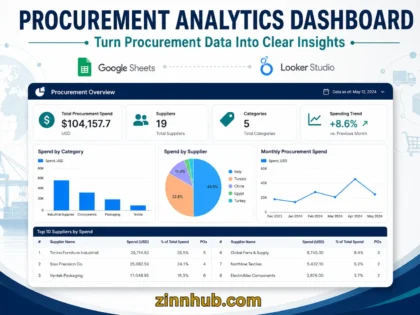

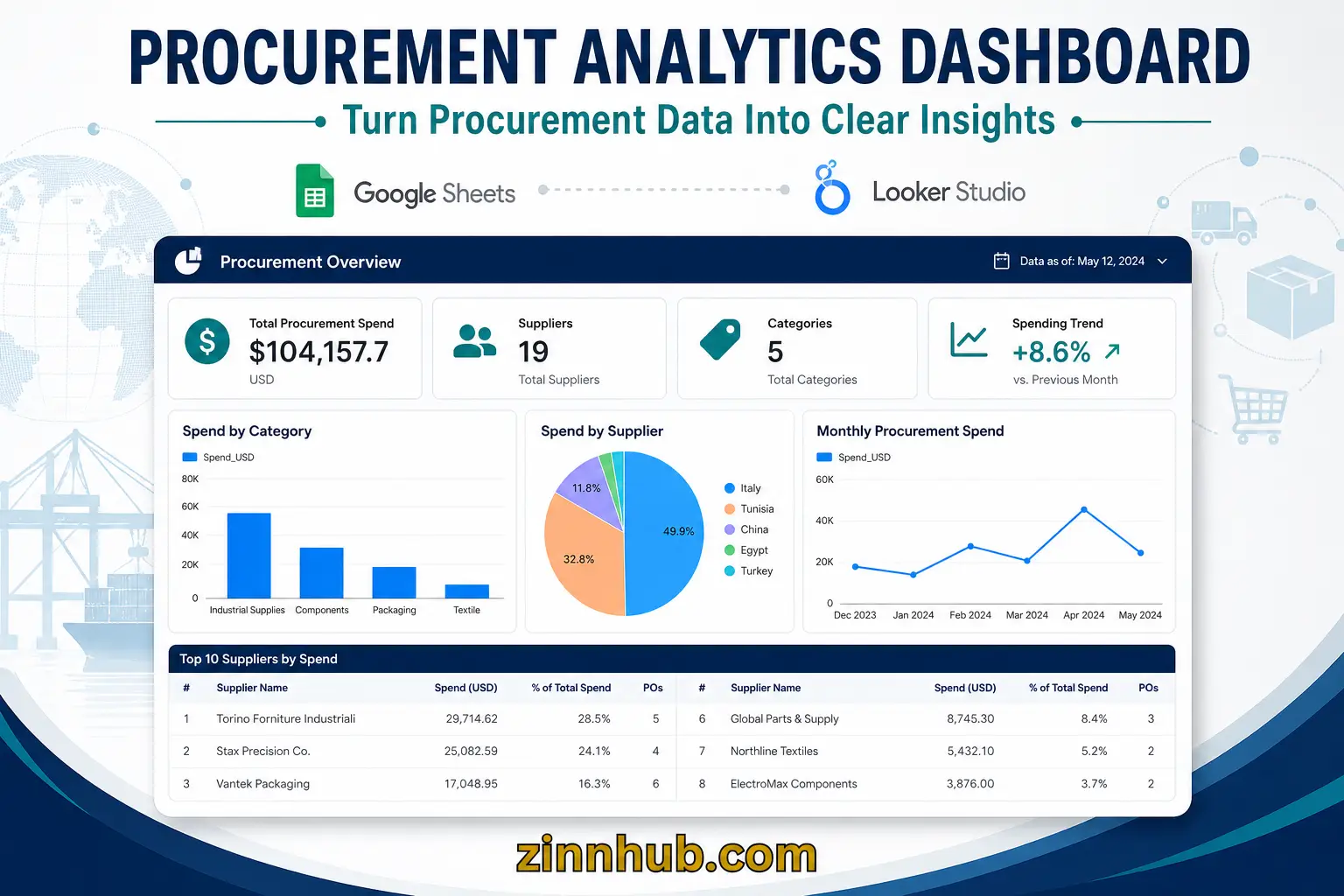
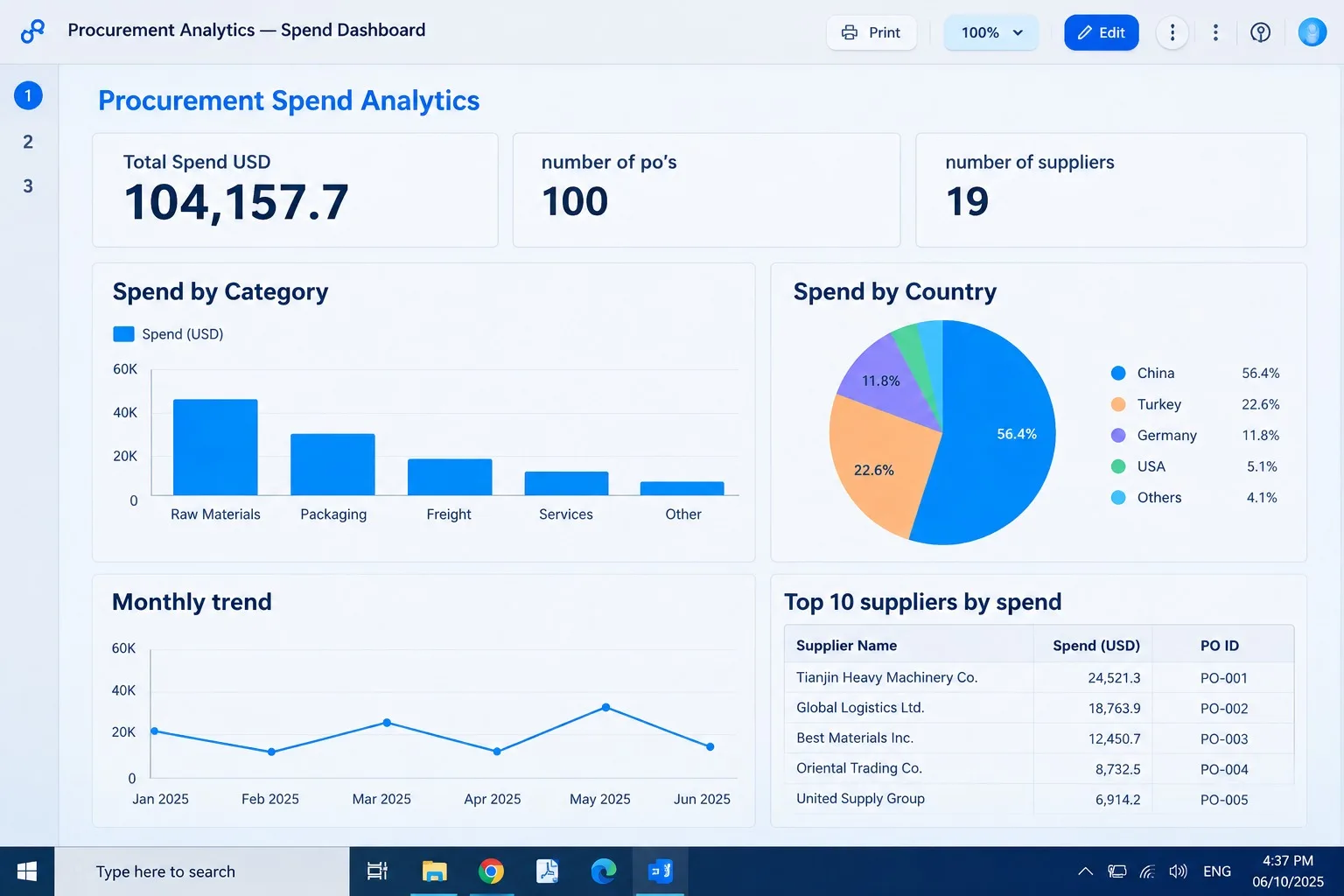
Turn your procurement data into a clear Looker Studio dashboard showing spending patterns, supplier performance, category trends, and key purchasing insights.

I Will Create an Interactive Procurement Spend and Supplier Analytics Dashboard in Looker Studio
A focused interactive procurement dashboard covering core spending, supplier, category and trend analysis.
- Procurement data review & preparation
- Procurement KPI cards
- Supplier spending analysis
- Category spending analysis
- Spending trend analysis
- Interactive dashboard filters
- 5–6 interactive charts/visuals
- Looker Studio dashboard
- 1 revision
A deeper procurement dashboard with detailed supplier, category and purchasing analysis.
- Everything in Procurement Dashboard
- Detailed supplier comparison
- Detailed category analysis
- Monthly/period performance analysis
- Supplier concentration analysis where supported
- Additional procurement KPIs
- 7–9 interactive charts/visuals
- Key findings summary
- 2 revisions
A comprehensive procurement dashboard with deeper purchasing-pattern and supplier intelligence.
- Everything in Procurement Analytics
- Deeper supplier and category segmentation
- Purchasing-pattern analysis
- Additional data breakdowns where supported
- Advanced interactive filters
- 9–12 interactive charts/tables
- Management-oriented insights summary
- 2 revisions
Request a Custom Offer
Log In to Request a Custom Offer
Create a free account or log in to request a personalised offer from this Zinner.
Log In / RegisterAsk a Pre-Sale Question
Log In to Ask a Question
To reduce platform spam, pre-sale messages can only be sent by logged-in users.
Create a free account or log in to message this Zinner directly.
Log In / RegisterAt a Glance
Key details about this service to help you decide. Generated by Zinn Hub, not the seller.
Value Position
BI Tool
Data Input
Analysis Scope
Best For
What You'll Receive
Full Description
Interactive Procurement Spend & Supplier Analytics Dashboard in Looker Studio
Do you want to understand where your procurement budget goes, identify your main suppliers, and make better purchasing decisions? I will create an interactive procurement spend and supplier analytics dashboard in Looker Studio using your available Excel or Google Sheets data.
My goal is to transform your purchasing data into a clear, structured, and interactive report that helps you monitor procurement performance, understand spending patterns, and identify opportunities for improvement.
What you will receive
1. Procurement Spend Analysis
-
Analyze total procurement expenditure and spending distribution.
-
Identify the categories, products, or departments representing the largest share of your spending.
-
Highlight spending patterns and potential cost-control opportunities.
-
Visualize procurement KPIs through clear charts and summary indicators.
2. Supplier Performance Overview
-
Compare supplier spending and purchasing volumes using the available data.
-
Identify your most significant suppliers by expenditure.
-
Examine supplier concentration and purchasing distribution.
-
Help you understand how your purchasing activity is distributed across suppliers.
3. Interactive Dashboard
-
A Looker Studio dashboard with clear visualizations and relevant KPIs.
-
Interactive filters to explore the available data by supplier, category, period, or other suitable dimensions.
-
A structured layout designed to make procurement information easier to understand.
-
A shareable online report for convenient access.
4. Data Analysis and Insights
Beyond presenting charts, I will highlight relevant patterns and observations supported by your data. Depending on the information available, these may include spending concentration, category-level variations, supplier comparisons, and potential areas for further investigation.
What I need from you
Please provide your procurement data in Excel or Google Sheets format, along with a brief explanation of your business objectives and the questions you want the dashboard to answer.
Your dataset may contain supplier names, purchase dates, product or service categories, quantities, unit prices, and total expenditure. The analysis will depend on the fields and data quality available.
Who can benefit from this service?
This service is suitable for small and medium-sized businesses, procurement teams, purchasing managers, operations professionals, and business owners who want better visibility into their purchasing activity without investing in complex business intelligence software.
I focus on making procurement data easier to understand and use. You will receive an interactive dashboard designed around your available data, with visual insights that can support more informed purchasing and cost-management decisions.
Let's turn your procurement data into a clearer picture of your spending and supplier relationships.
Zinner Quality Guarantee
Every Zinner is reviewed and approved before joining the platform.
All services are backed by our quality assurance commitment.
Your payment is protected until you approve the delivered work.
Compare Packages
| Feature | Procurement Dashboard | Procurement Analytics | Procurement Intelligence |
|---|---|---|---|
| Delivery Time | 3 days | 3 days | 3 days |
| Procurement data review & preparation | ✓ | ✓ | ✓ |
| Procurement KPI cards | ✓ | ✓ | ✓ |
| Supplier spending analysis | ✓ | ✓ | ✓ |
| Category spending analysis | ✓ | ✓ | ✓ |
| Spending trend analysis | ✓ | ✓ | ✓ |
| Interactive dashboard filters | ✓ | ✓ | ✓ |
| interactive charts/visuals | 5–6 interactive charts/visuals | 7–9 interactive charts/visuals | 9–12 interactive charts/tables |
| Looker Studio dashboard | ✓ | ✓ | ✓ |
| revision/s | 1 revision | 2 revisions | 2 revisions |
| Everything in Procurement Dashboard | ✓ | ✓ | ✓ |
| Detailed supplier comparison | ✕ | ✓ | ✓ |
| Detailed category analysis | ✕ | ✓ | ✓ |
| Monthly/period performance analysis | ✕ | ✓ | ✓ |
| Supplier concentration analysis where supported | ✕ | ✓ | ✓ |
| Additional procurement KPIs | ✕ | ✓ | ✓ |
| Key findings summary | ✕ | ✓ | ✓ |
| Everything in Procurement Analytics | ✕ | ✓ | ✓ |
| Deeper supplier and category segmentation | ✕ | ✕ | ✓ |
| Purchasing-pattern analysis | ✕ | ✕ | ✓ |
| Additional data breakdowns where supported | ✕ | ✕ | ✓ |
| Advanced interactive filters | ✕ | ✕ | ✓ |
| Management-oriented insights summary | ✕ | ✕ | ✓ |
Samples
View examples of the seller's work related to this Zinn.
Portfolio
Examples of the seller's work related to this Zinn.
Procurement Analytics Dashboard — Supplier & Spend Analysis
Built an interactive procurement analytics dashboard to transform raw purchasing data into clear spending and supplier insights. The project analyzes total procurement spend, spending by supplier and category, purchasing trends over time, and key procurement KPIs. Interactive filters allow users to explore the data by relevant dimensions and identify major spending patterns.
Extra Information
My Process
Tools I Use
Service Details
Frequently Asked Questions
Ideally, your dataset should include supplier, product or category, date or period, quantity, unit price, and total spending. However, I can work with the fields available in your dataset and will clearly indicate which analyses can be supported.
No. I will review and prepare the available data before building the dashboard. The quality and structure of your data will determine which KPIs and analyses can be reliably included.
You will receive an interactive Looker Studio Procurement Analytics dashboard with the features included in your selected package, along with a concise summary of the main findings. Supporting data may also be provided where applicable.
No. You do not need to provide your Google, Looker Studio, or other account passwords. I only need the procurement data and information required to perform the analysis.
Yes. I am willing to sign an NDA when required. Please mention this before or immediately after placing the order so the appropriate confidentiality arrangements can be established.
The completed dashboard is delivered through a shareable Looker Studio link with view access. If you need an editable version for ongoing updates, please mention this before ordering so the appropriate delivery setup can be confirmed.
The service is designed primarily for small-to-medium procurement datasets. If your dataset contains tens of thousands of rows or requires substantial data transformation, please contact me before ordering so I can confirm the appropriate scope and package.
Customer Reviews
See what our customers say about this Zinn